Fred Meyer
- 3.9
- Rating
- 1.00M
- Installs
- Free
- Price

 Analysis by App-foxy
I use Fred Meyer as a practical shopping companion rather than as a place to browse endlessly. It brings store savings, digital coupons, weekly advertising, rewards information, store-finding tools, and a shopping list into one free shopping app from The Kroger Co. That combination makes the most sense when I already know I am heading to Fred Meyer and want to prepare before leaving home.
My overall impression is positive, but not uncritical. The app can reduce the small bits of friction that make a grocery trip more expensive or disorganized. At the same time, it works best when I am willing to spend a few minutes planning, checking offers, and keeping my list tidy. If I only want a quick product search or a simple note-taking list, a lighter alternative may feel faster.
How Fred Meyer feels in everyday use
The current app is a fairly mature product. It has been available since December 19, 2012, and the current release is version 97.2. That long history shows in the way the main shopping tasks are grouped together: savings, ads, rewards, store information, and lists are treated as parts of one trip instead of separate errands.
You May Also Like

 Blood Strike: 2.5 Anniversary
Blood Strike’s Loadouts Turn Every Drop Into a Tactical Gamble
A close look at Blood Strike’s custom loadouts: how fast access to signature weapons reshapes its battle royale rhythm, rewards preparation, and narrows the gap between fights.

 Pandora - Music & Podcasts
Pandora’s Music Is Easy to Start, but Harder to Recover
Pandora’s strength is its low-effort path from a seed to a station. Its weak spot is how much confidence it asks you to place in connection, setup, and quiet recovery.

 8 Ball Pool
 Is Built on Rivalries, Rematches, and Routine
A close look at the rivalries, rematches, shared routines, and unanswered safety questions that turn a quick pool match into a persistent mobile community.

 Samsung Music
’s Quiet Strength Is Playing What You Already Own
Its reach comes less from spectacle than from dependable access to a personal library. That simplicity is both the app’s strongest retention engine and its ceiling.

 AccuWeather: Weather Radar
AccuWeather Review: A Quick, Clear Forecast for Everyday Decisions
For everyday plans, the best forecast is the one you can understand quickly. AccuWeather makes rain timing, radar, and local conditions easy to act on, with a few trade-offs.

 Hill Climb Racing
Why Hill Climb Racing Still Turns Crashes Into One More Run
A tiny car, a bumpy hill and one more upgrade: Hill Climb Racing keeps resurfacing because its simple chaos makes every near-miss feel personal.
More From Our News Desk



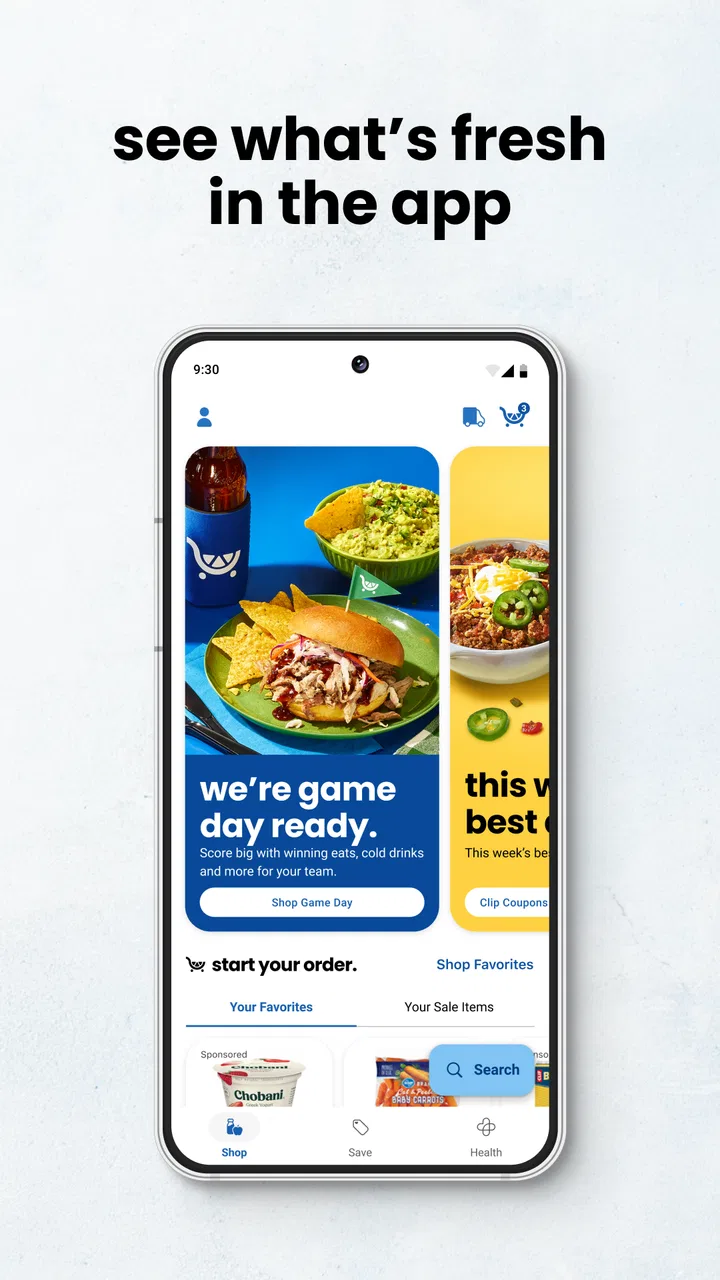
I find that approach useful because grocery shopping rarely involves just one action. Before going out, I may want to look at the weekly advertising, save a coupon, check which Fred Meyer location is convenient, and build a list. During the trip, the list becomes the main screen I care about. Afterward, the savings and rewards areas help me understand whether the preparation was worthwhile.
The app is free, and its Everyone content rating makes it suitable for ordinary household shopping. It requires Android 8.0 or later, so people using an older Android phone should check compatibility before planning around it. On supported devices, the basic idea is easy to understand: open the app, choose the store-related task you need, and keep the useful information together.
The strongest part of Fred Meyer is the connection between planning and saving. A coupon by itself is easy to forget. A shopping list by itself does not help with price awareness. The value appears when I use both: I decide what I need, review relevant offers, and then shop with fewer last-minute decisions.
Who gets the most value from it
This is a particularly good fit for regular Fred Meyer shoppers who already use the store’s rewards program or want to pay closer attention to weekly offers. It is also useful for households where one person prepares the trip and another person does the shopping. A list inside the store’s own app is more convenient than copying items from an advertisement into a separate notes application.
Families can benefit from the same workflow. I can think through meals, add the ingredients I need, and check the available promotions before visiting the store. Someone shopping after work does not have to remember every detail from a conversation earlier in the day. The app becomes a shared point of reference, even if the actual planning still happens outside it.
It is less compelling for someone who shops at many unrelated retailers and wants a universal grocery tool. Fred Meyer is intentionally tied to one shopping environment. If my main goal is comparing prices across several chains, collecting recipes, or managing a detailed pantry inventory, I would look for a specialized service instead.
A realistic shopping workflow
Imagine I am preparing for a weekend meal and a normal household restock. I start by opening the weekly advertising section to see whether any planned purchases deserve attention. I then review the coupon area rather than saving everything indiscriminately. This matters because a crowded collection of offers can make it harder to remember which savings actually relate to my trip.
Next, I add the required groceries to the shopping list. I prefer separating essentials from optional purchases, even if the app does not force a particular planning style. Essentials are the items I need for the meal and household basics; optional items are things I will buy only if the offer or budget makes sense. That small distinction helps prevent a promotion from turning into an unplanned purchase.
Before leaving, I use the store-finding function to confirm which location is relevant. This is more useful than it sounds when I am shopping near work, traveling between neighborhoods, or deciding whether a different branch is worth the detour. Once inside, I mark items as I go instead of relying on memory. I can then treat the remaining list as a reminder of what still needs attention, not as a second mental checklist.
The important insight is that I do not treat the app as a digital flyer alone. I use it in three stages: decide, prepare, and execute. The savings tools are most helpful before the trip, while the list is most helpful during it. Mixing those roles together without a plan can make the experience feel busier than necessary.
What the current version suggests about product evolution
The move to version 97.2 suggests an app that has continued through many rounds of maintenance and refinement rather than remaining a one-time store companion. I would expect an established shopping app to focus on keeping its core areas usable as store information, offers, and account-related shopping tasks change over time. The practical result for me is less about a dramatic new feature and more about having one current place to begin a Fred Meyer trip.
I would not interpret the version number as proof that every part of the experience is equally polished. Mature apps often accumulate layers: a list feature may feel straightforward, while savings or account-related screens may require more attention. What matters is whether the current release supports the routine I actually have. For my use, the central workflow remains clear enough when I enter with a specific purpose.
The app has an average rating of 3.9 from around 41 thousand ratings, with about 7.9 thousand written reviews. I read that as a sign of a useful but not universally smooth experience. People are likely judging several different jobs at once: finding a store, managing offers, checking advertisements, and organizing a trip. A person who needs only one of those functions may feel very differently from someone who depends on all of them.
It has more than a million installs, which also fits its role as a recognized retailer-specific tool rather than a niche experiment. That reach does not guarantee that it will suit every phone or shopping style, but it does make the app worth considering for people who regularly shop at Fred Meyer.
How existing users may experience the changes
For an existing user, the most noticeable benefit of a maintained app is continuity. I can keep returning to the same general place for store discovery, savings, and list preparation instead of rebuilding my routine in separate tools. That is especially valuable when I shop frequently: even a modest improvement in preparation can save time over many trips.
There is also a trade-off. A retailer app has to serve occasional visitors as well as experienced users. New users may see several useful areas at once and wonder where to begin, while long-time users may want a faster route directly to the list or their saved offers. I recommend choosing one starting point based on the trip. If I am already organized, I go straight to the list. If I am trying to reduce the cost of a larger shop, I begin with offers and the weekly advertising.
Existing users should also keep their expectations practical. The app can organize shopping information, but it cannot make an indecisive trip efficient by itself. I still need to decide what I am buying, notice when an offer does not fit my needs, and avoid treating every highlighted item as a bargain. The app supports judgment; it does not replace it.
One useful habit is to review the list immediately before entering the store. I remove items I no longer need and group my thinking by the way I expect to shop. Even without relying on a sophisticated inventory system, this reduces the chance that I will wander back through the same area or forget a small but important item. The app is most effective when I keep the information current instead of letting old lists accumulate.
Where Fred Meyer still has limits
The biggest limitation is focus. This is not a complete food-planning platform, a universal price-comparison service, or a general household organizer. If I want to compare Fred Meyer with several competing stores in one view, I need another method. If I want recipes to automatically create a carefully categorized grocery plan, I may prefer a dedicated meal-planning app.
The savings workflow can also demand attention. Coupons and advertising are helpful only when I connect them to purchases I intended to make. Someone who dislikes promotional browsing may find the process distracting. I would not recommend installing the app solely because it promises savings if I am unwilling to check offers before shopping and make deliberate choices in the store.
The shopping list is convenient, but I would not treat it as a full inventory manager. A simple list answers “what should I buy?” better than “what do I already have, when will it expire, and how much remains?” For a large household with detailed stock control, a specialized pantry app will be more appropriate. Fred Meyer works better as a trip list than as a complete home-management system.
There is another practical trade-off between convenience and concentration. Keeping ads, offers, rewards, stores, and lists together means I do not need several retailer tools, but it also means the app has more areas competing for my attention. I get the best results when I decide my objective before opening it. Otherwise, a quick list update can turn into unnecessary browsing.
People who rarely shop at Fred Meyer should also think carefully about whether a retailer-specific installation is worthwhile. If my visits are occasional and I already use a basic notes app, the extra shopping features may not justify changing my routine. The dedicated app becomes more valuable as the store becomes a regular part of my weekly shopping.
Practical ways to use it more effectively
My first recommendation is to plan from the list backward. I write the items I genuinely need, then look at offers and advertising with that list in mind. This reverses the tempting but expensive habit of starting with promotions and inventing reasons to buy. It also makes the app feel like a budgeting aid rather than a stream of distractions.
Second, I use the store-finding tool before I leave, not only when I am already outside. That gives me a chance to choose the most sensible location for the trip and avoid building a plan around a branch that is inconvenient. It is a small step, but it matters when time, traffic, or multiple errands shape the route.
Third, I separate “must buy” from “consider buying” in my own planning. The distinction helps me evaluate a coupon honestly. If the item is already on my list, the offer may improve the trip. If it is not, I ask whether it solves a real need. This is one of the clearest ways to turn the app’s promotional tools into useful savings instead of extra spending.
Fourth, I check the app shortly before shopping rather than relying on a list prepared far in advance. Offers and weekly advertising are time-sensitive parts of the shopping experience, while household needs can change. A final review keeps the list aligned with the actual trip and reduces the risk of carrying outdated plans into the store.
Finally, I would keep a separate backup for information that matters beyond the immediate trip. The Fred Meyer list is ideal for shopping preparation, but I would not use it as the only place for long-term meal plans, allergy notes, or a household inventory. That division of labor keeps the retailer app simple and prevents it from being asked to do a job it was not designed to handle.
What I would watch as the app continues
For future updates, I would pay attention to how quickly the app lets regular shoppers reach their most-used area. A first-time visitor may appreciate the broad collection of tools, but returning users benefit from fewer steps. The best evolution would preserve the all-in-one approach while making the path from opening the app to checking a list or offer feel more direct.
I would also watch the balance between promotional content and personal control. Advertising and coupons are central to the app’s purpose, yet the experience should still feel manageable for someone who wants to shop from a clear list. Improvements that make it easier to distinguish relevant offers from general promotions would have a meaningful effect on everyday use.
Another area worth watching is consistency across the core tasks. Store information, savings, rewards, advertising, and lists are valuable together only when they feel like parts of one workflow. If one section becomes noticeably slower or more complicated than the others, users may return to separate tools. A smooth connection between preparation and in-store use matters more to me than adding a long collection of unrelated extras.
I would also look for continued attention to people who shop in different ways. A weekly grocery shopper, a parent making a large trip, and an occasional visitor do not need the same starting screen. Flexibility in how users reach their lists, offers, and store details would make the app more comfortable without changing its basic purpose.
My final recommendation
I recommend Fred Meyer to regular Fred Meyer shoppers who want one free app for store discovery, weekly shopping preparation, digital savings, rewards-related tasks, and lists. The app is most useful when I treat it as a planning tool: I decide what I need, check relevant offers, confirm the store, and use the list to stay focused while shopping.
I would skip it if I need a retailer-neutral comparison service, a recipe-driven meal planner, or detailed pantry management. A simple notes app may be quicker for an occasional visit, while a specialized grocery tool may be stronger for complex household organization. Those are not failures; they are boundaries created by the app’s store-specific purpose.
For the right shopper, the convenience is real. I spend less time switching between a flyer, a coupon area, a store locator, and a separate list. The experience still benefits from discipline, because promotions can distract and the list requires upkeep. But if Fred Meyer is already one of my regular stores, installing its dedicated shopping app is a sensible way to make each trip more deliberate and potentially less wasteful.
FAQs for Fred Meyer
01What is the Fred Meyer app used for?
The Fred Meyer app is designed to make shopping easier by combining weekly ads, digital coupons, rewards information, shopping lists, and store-related services in one place. After signing in, you can browse products, search for deals, and manage your digital account. Available features may vary depending on your location, account status, and the services offered by your selected Fred Meyer store.
02Can I use Fred Meyer digital coupons and rewards in the app?
Yes, the app generally allows eligible shoppers to view and digitally clip available coupons, as well as access Fred Meyer Rewards information connected to their account. Before shopping, make sure you are signed in and that the correct rewards card or phone number is linked. Coupon terms, expiration dates, product restrictions, and participating departments should always be checked before checkout.
03Does the Fred Meyer app support grocery pickup or delivery?
In supported areas, the Fred Meyer app may let you shop for groceries online and choose services such as pickup or delivery. Availability depends on your selected store, local inventory, delivery coverage, and the time slots offered. Orders can include additional fees or substitutions, so review the final order summary carefully and confirm that the service is available at your address.
04Do I need a Fred Meyer account to use the app?
Some basic browsing functions may be available without signing in, but an account is usually needed to access personalized features such as digital coupons, rewards, shopping lists, online orders, and saved preferences. Creating an account may require personal information and account verification. Use the same details associated with your Fred Meyer Rewards account to help ensure your benefits are properly recognized.
05Is the Fred Meyer app free to download and use?
The Fred Meyer app is generally free to download from the official Android or iOS app store, and there is normally no separate charge for installing it. However, purchases made through the app still cost money, while pickup, delivery, service, or handling fees may apply depending on the order. A stable internet connection and a compatible device are also required.
Pros
- Convenient pickup and delivery options for everyday groceries.
- Digital coupons can help reduce the cost of regular purchases.
- Fuel rewards may provide extra savings at participating stations.
- Store locations offer groceries
- pharmacy
- and household essentials together.
- Shopping lists and saved items make repeat purchases easier.
Cons
- Some deals require a loyalty account or digital coupon activation.
- Product availability can vary by store and change before pickup.
- Delivery fees and service charges may increase the final order total.
- The app may feel slow when browsing large departments or promotions.
- Rewards and coupon rules can be difficult to understand at first.

Fred Meyer
Gallery